
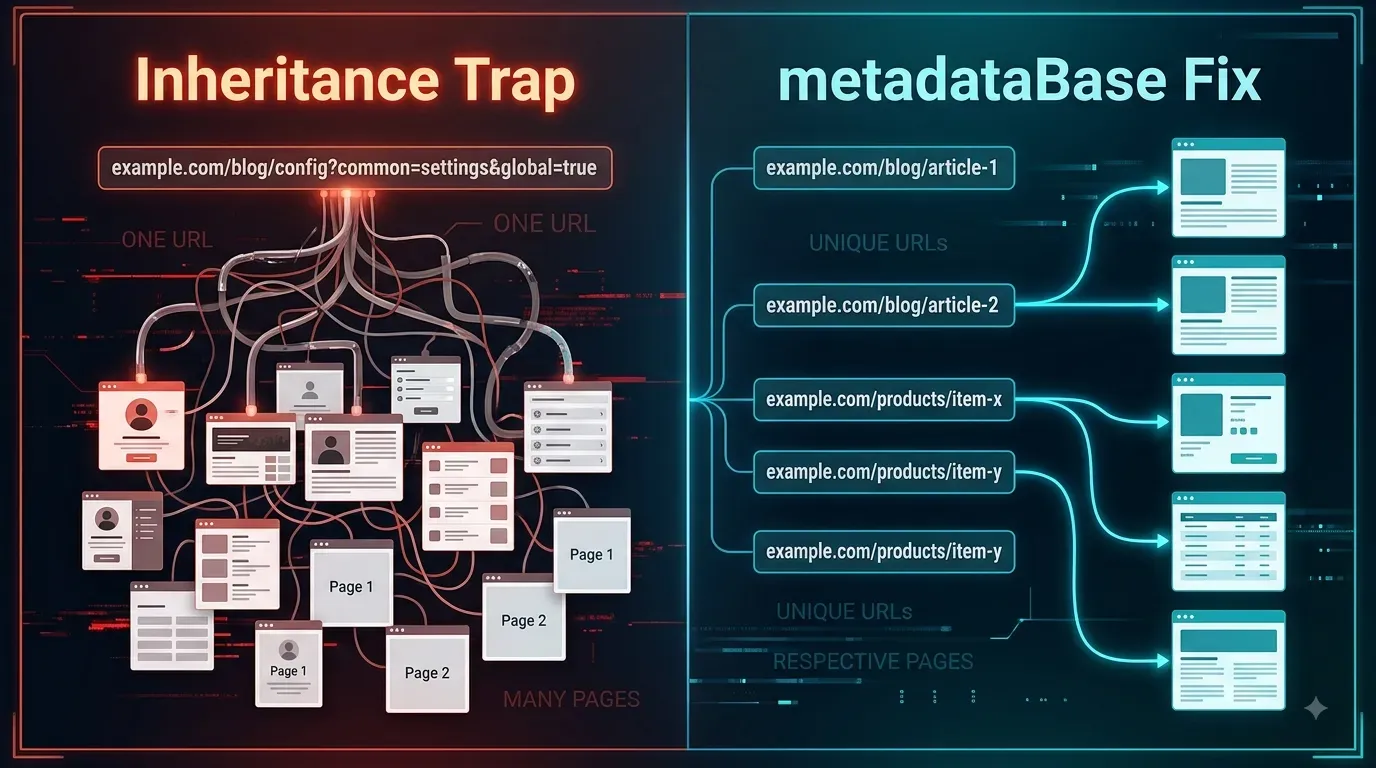
The Homepage Canonical That Almost Poisoned My Entire SEO
A single line of metadata in my root layout silently cascaded across my entire application. I almost told Google to ignore every subpage on my site. Here is how an automated verification script saved my SEO.
When you build modern, full-stack applications, you spend the majority of your time worrying about runtime errors, database bottlenecks, and state management. You write unit tests to ensure your APIs don't crash and your components render correctly.
But sometimes, the most dangerous bugs in software engineering are entirely silent. They don't break the build. They don't throw an HTTP 500 Internal Server Error. The browser renders the page perfectly, and the user experience is completely flawless.
I recently encountered one of these silent killers while configuring the metadata architecture for the Webshastraa Next.js website. A single, seemingly harmless line of code in my root layout created a catastrophic SEO risk that almost told Google to completely ignore my entire content library.
This is the story of the canonical URL inheritance trap, why a green deployment badge is an illusion, and how an automated verification script saved the platform before the damage could be done.
---
1. What Is a Canonical URL?
Before diving into the bug, we must establish exactly what a canonical URL does.
In the eyes of a search engine like Google, a website might have multiple URLs that lead to the exact same content. For example:
https://www.webshastraa.in/engineeringhttps://webshastraa.in/engineering?sort=latesthttps://www.webshastraa.in/engineering?utm_source=twitter
To Googlebot, these look like three separate pages with duplicate content. If left unmanaged, search engines might penalize the site for spam, or dilute the ranking power across all three links.
To solve this, we use a Canonical URL. It is a hidden HTML <link> tag placed in the <head> of the document that essentially says: "Hey Google, I know you found these three different URLs, but they are all just copies. Please consolidate all ranking signals and index this specific master URL."
It is one of the most powerful tools in Technical SEO. It is also a tool that, if aimed in the wrong direction, can cause immense self-inflicted damage.
---
2. The Next.js Metadata Architecture
In the Next.js App Router, metadata is incredibly elegant. Instead of manually injecting <head> tags into every component, you export a metadata object from a page.js or layout.js file.
The framework relies heavily on nested layouts. If you define metadata in the root layout.js file, that data automatically cascades down and is inherited by every single child page in the application, unless a child page explicitly overwrites it.
This inheritance model is brilliant for global variables. If you set your og:site_name or your global Twitter handle in the root layout, you never have to type it again. It automatically applies to your /blog, your /about page, and your dynamic /engineering routes.
But I made a fatal mistake: I treated the canonical URL as a global variable.
---
3. The Inheritance Trap
While setting up the foundational SEO for Webshastraa, I opened the root layout.js file. I wanted to establish the base URL for the site, so I added the homepage URL as the canonical link in the root metadata object.
My logic was flawed, but straightforward: I'll set the homepage as the default canonical, and I'll just overwrite it on the pages that need it.
I compiled the application. The homepage loaded perfectly. The <head> tag correctly displayed <link rel="canonical" href="https://www.webshastraa.in" />.
Then, I navigated to the Engineering category hub at https://www.webshastraa.in/engineering.
Because I had not explicitly overwritten the alternates.canonical object in the specific page.js for the Engineering hub, the Next.js engine did exactly what it was programmed to do. It traversed up the file tree, found the canonical URL in the root layout, and inherited it.
The expected canonical for the Engineering hub should have been:https://www.webshastraa.in/engineering
Instead, the inherited metadata resulted in:https://www.webshastraa.in
---
4. Why This Almost Poisoned the Entire Site
To a human user, the website looked perfectly normal. You click on "Engineering," the router fetches the page, and you read the articles.
But search engine crawlers do not see the CSS. They see the metadata. Because of this inheritance bug, every single dynamic category, blog post, and engineering diary that didn't have a hardcoded canonical override was screaming the exact same message to Googlebot:
This is the equivalent of SEO poison. If this had gone to production and Google had crawled it, the search engine would have obediently consolidated all of the site's ranking signals to the homepage. It would have systematically de-indexed our Engineering Diaries, our dynamic categories, and our technical tutorials. The site would have effectively vanished from specific search queries, and it would have looked like a catastrophic Google penalty.
---
5. The Discovery: Automated HTML Verification
I did not discover this bug because Google sent me a warning email. I did not discover it because the site lost traffic (it hadn't gone live yet). I didn't even discover it by manually inspecting the source code in Chrome.
I caught it because I had recently engineered a custom automated verification script (verify-batch2.mjs) for the local CI/CD pipeline.
The purpose of this script was to boot up the local Next.js server, programmatically fetch the raw HTML of our dynamic routes, and evaluate the DOM output to ensure specific technical requirements were met before any code was allowed to be pushed to Vercel.
One of the regex checks inside that script was specifically designed to audit the <head> of our child pages:
When I executed the verification script in the terminal, it aggressively halted. The terminal glowed red, throwing the exact assertion error I had written: Engineering hub inherited the homepage canonical URL.
The script caught the poison before it could ever reach the production database.
---
6. The Fix: Structuring Metadata Correctly
Fixing this architectural flaw required aligning with how Next.js explicitly wants you to handle metadata paths.
Instead of hardcoding the full canonical URL in the root layout, you must use the metadataBase property. This property establishes the root domain for the entire application, allowing child pages to automatically resolve relative URLs into absolute URLs.
Step 1: Clean the Root Layout
Step 2: Generate Metadata on Dynamic Routes
For dynamic pages (like an engineering diary slug or a category hub), we utilize the generateMetadata function. Because metadataBase is defined at the root, we only need to pass the relative path, and Next.js constructs the perfect, page-specific canonical URL.
With these two changes, the inheritance trap was permanently dismantled. The homepage had its canonical. The /engineering hub generated its own distinct canonical. Every dynamic diary entry pointed exclusively to itself.
I ran the verification script again. It passed with 100% success.
---
7. The Ultimate Engineering Lesson
This near-miss fundamentally changed how I view frontend architecture.
A successful Next.js build does not mean the generated SEO metadata is correct. An application can compile perfectly, deploy seamlessly to Vercel, pass all React hydration checks, and return a flawless HTTP 200 OK, while simultaneously producing catastrophic canonical URLs that actively command search engines to destroy your indexing.
SEO metadata can no longer be viewed as an afterthought or a "marketing task." In a server-side rendered or statically generated framework like Next.js, metadata is deeply intertwined with the application routing tree.
SEO metadata must be treated as core application behavior.
Just as you write unit tests to ensure your database saves a user profile correctly, you must write integration scripts to fetch your HTML and verify that your canonicals, Open Graph tags, and JSON-LD schemas are rendering the mathematically correct data.
Do not trust your assumptions. Do not trust the green deployment badge. Verify the DOM.
---
---
💡 Key Engineering Takeaways
Frequently Asked Questions
What is a Canonical URL and why does it matter for SEO?
A canonical URL is an HTML `<link>` tag that tells search engines which version of a URL is the "master copy." It prevents duplicate content issues. If multiple URLs display the same content (e.g., due to tracking parameters), the canonical tag ensures Google consolidates ranking signals and only indexes the preferred URL.
How does metadata inheritance work in the Next.js App Router?
In Next.js, metadata objects exported from a parent `layout.js` file automatically cascade down to all child `page.js` files. Child pages will inherit all parent metadata unless they explicitly export their own properties to overwrite them.
Why is putting a canonical URL in the root `layout.js` dangerous?
If you hardcode a canonical URL (like the homepage) in the root layout, every single page on your website will inherit that exact canonical URL unless overwritten. This tells search engines that every page on your site is just a duplicate of the homepage, leading to the de-indexing of all your subpages.
How does `metadataBase` fix canonical URL generation in Next.js?
By setting `metadataBase: new URL('https://yourdomain.com')` in the root layout, you define the root domain globally. Then, in child pages, you only need to provide the relative path (e.g., `canonical: '/blog/post'`). Next.js intelligently combines them into a perfect absolute URL.
Why won't a broken canonical URL throw a build error?
Search engine optimization metadata is technically just standard HTML tags in the document `<head>`. A framework compiler only checks for JavaScript/TypeScript syntax and logic errors. It cannot know what your SEO strategy is, so it will happily compile and deploy an application with completely incorrect canonical URLs without throwing a single error.
Feedback
Was this article helpful?
Related Engineering Diaries
Building 82 Pages in 49 Seconds: What Actually Made the Difference
Stop wasting expensive CI/CD minutes on slow deployments. Discover seven proven architectural secret...
Why My Green Vercel Deployment Returned a 404
Vercel displayed a green deployment success badge, but my live production URL returned a pristine 40...
GitHub Accepted My Code. Vercel Rejected My Identity.
GitHub accepted the push, but Vercel blocked the deployment because of Hobby plan collaboration limi...

