
Why My Green Vercel Deployment Returned a 404
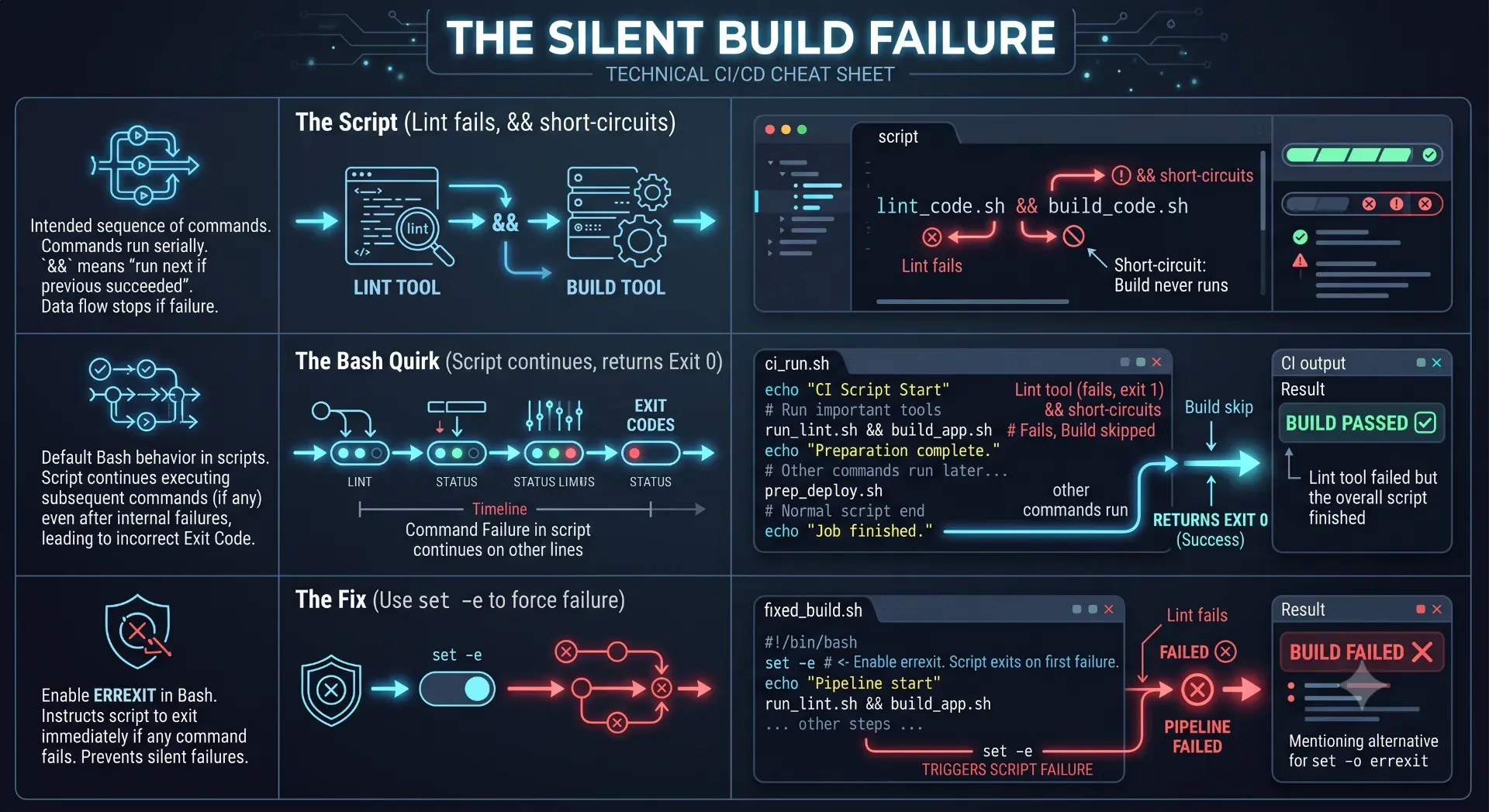
Vercel displayed a green deployment success badge, but my live production URL returned a pristine 404 Not Found. After five hours of debugging, I discovered the real culprit wasn't Next.js or Vercel—it was an AI-generated build command that silently deployed nothing.
&& operator (npm run lint && next build) as a hard gatekeeper to prevent bad code from reaching production. If the linter fails, the build stops. It is a foolproof system.404: NOT_FOUND1. The 5-Hour Debugging Descent
Assumption 1: Next.js Routing is Broken
- Did the AI accidentally delete
app/page.tsx? No, the file was sitting right there. - Was there a syntax typo in the route grouping? No.
- Did it compile locally? Yes, running
npm run devworked perfectly on my machine.
Assumption 2: Middleware is Blocking the Request
middleware.ts. It was perfectly standard. I even deleted the file and triggered a manual redeployment just to be absolutely safe. Assumption 3: Build Output Directory Mismatch
.next folder but the framework exported to a static out folder). I checked the Vercel project settings in the dashboard. Everything was perfectly set to the Next.js defaults.2. The Discovery: Downloading the Artifact
404 Not Found. 3. The AI's Lethal Linux Mistake
package.json, the AI had decided to be "helpful" and created a custom Linux bash script (build.sh) to handle the pipeline.💡 Key Engineering Takeaways
Frequently Asked Questions
What exactly is a Vercel empty deployment?
An empty deployment occurs when Vercel's build engine receives a successful exit code (Exit 0) from your build script, but the actual compilation step was skipped or failed silently. Vercel packages the empty output directory and deploys it to the edge, resulting in a live URL that returns a 404 Not Found error.
Why did the `&&` operator cause the build to skip?
In a Linux shell environment, the `&&` (Logical AND) operator ensures the second command only runs if the first command succeeds. Because `npm run lint` failed due to a code warning, the shell short-circuited and completely bypassed the `npm run build` command, leaving the output folder empty.
Why did Vercel think the deployment was successful if the build skipped?
Vercel determines success purely by the final exit code of the execution step. Because the AI placed the `&&` command inside a bash script without a strict error-handling flag, the bash script continued executing subsequent commands (like `echo`). The script finished successfully, returning an Exit 0 to Vercel, masking the earlier failure.
What does the `set -e` command do in a Linux bash script?
The `set -e` command is a vital safety mechanism in CI/CD pipelines. It instructs the bash shell to exit immediately with a non-zero status if any individual command or pipeline within the script fails. This prevents subsequent commands from running and ensures Vercel catches the error and halts the deployment.
How can I verify if my deployment is empty?
If you suspect an empty deployment, go to your Vercel project dashboard, click on the specific deployment, click the vertical three dots (options menu) in the deployment summary, and select "Download Output". If the downloaded ZIP file is empty or missing your static HTML/JS assets, your build command failed silently.
What exactly is a Vercel empty deployment?
An empty deployment occurs when Vercel's build engine receives a successful exit code (Exit 0) from your build script, but the actual compilation step was skipped or failed silently. Vercel packages the empty output directory and deploys it to the edge, resulting in a live URL that returns a 404 Not Found error.
Why did the `&&` operator cause the build to skip?
In a Linux shell environment, the `&&` (Logical AND) operator ensures the second command only runs if the first command succeeds. Because `npm run lint` failed due to a code warning, the shell short-circuited and completely bypassed the `npm run build` command, leaving the output folder empty.
Why did Vercel think the deployment was successful if the build skipped?
Vercel determines success purely by the final exit code of the execution step. Because the AI placed the `&&` command inside a bash script without a strict error-handling flag, the bash script continued executing subsequent commands (like `echo`). The script finished successfully, returning an Exit 0 to Vercel, masking the earlier failure.
What does the `set -e` command do in a Linux bash script?
The `set -e` command is a vital safety mechanism in CI/CD pipelines. It instructs the bash shell to exit immediately with a non-zero status if any individual command or pipeline within the script fails. This prevents subsequent commands from running and ensures Vercel catches the error and halts the deployment.
How can I verify if my deployment is empty?
If you suspect an empty deployment, go to your Vercel project dashboard, click on the specific deployment, click the vertical three dots (options menu) in the deployment summary, and select "Download Output". If the downloaded ZIP file is empty or missing your static HTML/JS assets, your build command failed silently.
What exactly is a Vercel empty deployment?
An empty deployment occurs when Vercel's build engine receives a successful exit code (Exit 0) from your build script, but the actual compilation step was skipped or failed silently. Vercel packages the empty output directory and deploys it to the edge, resulting in a live URL that returns a 404 Not Found error.
Why did the `&&` operator cause the build to skip?
In a Linux shell environment, the `&&` (Logical AND) operator ensures the second command only runs if the first command succeeds. Because `npm run lint` failed due to a code warning, the shell short-circuited and completely bypassed the `npm run build` command, leaving the output folder empty.
Why did Vercel think the deployment was successful if the build skipped?
Vercel determines success purely by the final exit code of the execution step. Because the AI placed the `&&` command inside a bash script without a strict error-handling flag, the bash script continued executing subsequent commands (like `echo`). The script finished successfully, returning an Exit 0 to Vercel, masking the earlier failure.
What does the `set -e` command do in a Linux bash script?
The `set -e` command is a vital safety mechanism in CI/CD pipelines. It instructs the bash shell to exit immediately with a non-zero status if any individual command or pipeline within the script fails. This prevents subsequent commands from running and ensures Vercel catches the error and halts the deployment.
How can I verify if my deployment is empty?
If you suspect an empty deployment, go to your Vercel project dashboard, click on the specific deployment, click the vertical three dots (options menu) in the deployment summary, and select "Download Output". If the downloaded ZIP file is empty or missing your static HTML/JS assets, your build command failed silently.
Feedback
Was this article helpful?
Related Engineering Diaries
Building 82 Pages in 49 Seconds: What Actually Made the Difference
Stop wasting expensive CI/CD minutes on slow deployments. Discover seven proven architectural secret...
One Shopify CDN Image Broke My Detection Engine
A single Shopify CDN image completely fooled my custom website detection engine into returning a fal...
"Works on My Machine" Never Happened Because Lint Said No
The phrase 'works on my machine' is an engineering failure. Discover how adding a single command to ...