
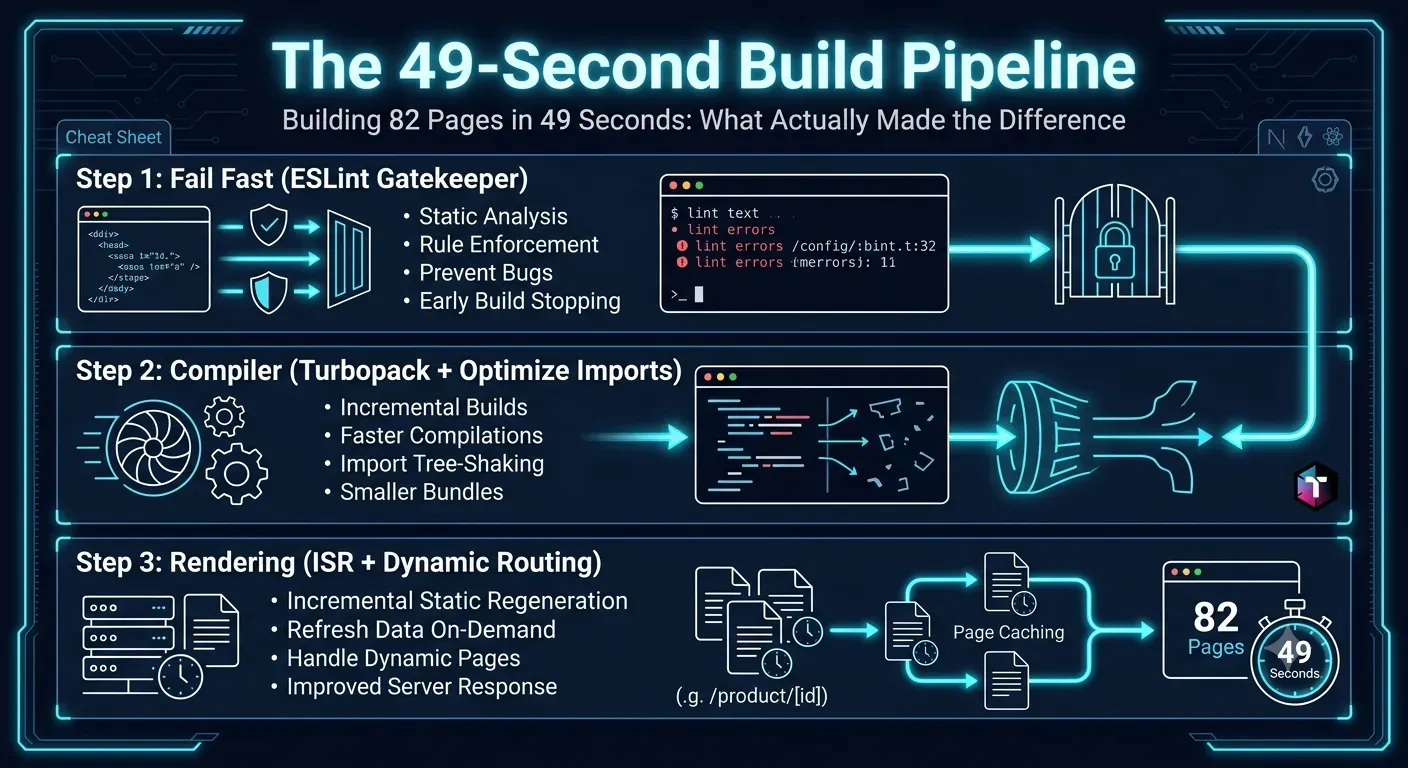
Building 82 Pages in 49 Seconds: What Actually Made the Difference
Stop wasting expensive CI/CD minutes on slow deployments. Discover seven proven architectural secrets to drastically reduce your Next.js build time, from leveraging experimental Turbopack features to mastering build caching and route optimization.
1. The Power of the Remote Build Cache
2 cores, 8 GB Linux container). Before it even looks at your package.json, it attempts to find shortcuts. Restored build cache from previous deployment (DhJAys8imNqyFfWLLHkGKR58YNve)node_modules and the .next/cache directory between deployments. npm ci (which respects the package-lock.json precisely) or standard npm install, and allow the Vercel infrastructure to restore the heavy Webpack and Babel caches automatically.2. Fail Fast: The Strict Linting Gatekeeper
npm run lint && next build prevents broken code from reaching production. But it also serves a secondary, performance-based purpose: failing fast.eslint --max-warnings=0 explicitly before the build command, you ensure that if there is a silly syntax error (like an unused import), the pipeline fails in exactly 2 seconds. It saves you the financial cost of spinning up the heavy build engine just to fail three minutes later.3. Enable Turbopack and optimizePackageImports
optimizePackageImports in your next.config.js, you drastically reduce module resolution time.@mui/material, lucide-react, or lodash export thousands of modules. Historically, importing one icon would force the bundler to parse the entire library. optimizePackageImports automatically maps these heavy dependencies, loading only the exact files your application uses. This single configuration flag can shave 15 to 30 seconds off your compilation phase.4. Master the Route Tree: Dynamic vs. Static Separation
- The
ƒ(Dynamic) Routes: Notice that every single/adminand/apiroute is flagged as Dynamic. The build engine completely skips compiling HTML for these pages. It knows these require real-time authentication and server-side rendering, so it defers the compute cost to runtime. - The
○(Static) Routes: Standard pages like/aboutor/contactare generated instantly because they require zero external data fetching.
5. Leverage Incremental Static Regeneration (ISR)
├ ● /blog/[slug] 1m 1ygenerateStaticParams to build only the most critical, highly trafficked pages during deployment. The 1m (one minute) revalidate tag tells the edge network to serve the cached static file, but if the cache is older than 60 seconds, rebuild it silently in the background on the next user request.6. Keep the Dependency Graph Lean
package.json. Every time a developer adds a new npm package, it increases the size of the node_modules folder, forcing the CI/CD runner to spend more time unzipping and linking binaries.moment.js just to format a single date string, you are poisoning your build time. Use native JavaScript APIs (Intl.DateTimeFormat) or micro-libraries (date-fns) instead. A lean dependency graph translates directly to lightning-fast initialization.7. Optimize Database Connections for the Build Environment
generateStaticParams to fetch data during the build phase, your application must connect to your database (e.g., MongoDB, PostgreSQL) from inside the Vercel container.Conclusion
Production Case Studies & Architecture References
- Client Case Study: Shopify Speed Optimization (95+ Core Web Vitals) — Measured production deployment & business results.
- Topic Deep-Dive: "Works on My Machine" Never Happened Because Lint Said No — Detailed guide on adjacent engineering patterns.
- Engineering Consultation: Custom Next.js & SaaS Development — Custom software engineering & architecture advisory.
💡 Key Engineering Takeaways
Frequently Asked Questions
Why does my Next.js build take longer than 5 minutes on Vercel?
Long build times are typically caused by three factors: fetching massive amounts of data to pre-render thousands of static pages, a bloated `package.json` that takes minutes to install, or importing heavy, unoptimized libraries that choke the Webpack compiler.
What does `optimizePackageImports` actually do?
In Next.js, `optimizePackageImports` is an experimental configuration flag that speeds up module resolution. Instead of parsing an entire massive library (like `@mui/icons-material`) when you only need one icon, the compiler intelligently maps and extracts only the specific file you requested, drastically reducing build memory and time.
How does Incremental Static Regeneration (ISR) speed up deployments?
Without ISR, Next.js must generate a static HTML file for every single database record at build time. With ISR, you can generate just the top 10 pages during the build, and configure the rest to be generated on-demand when a user visits them, completely offloading the compute time from your CI/CD pipeline.
Why is separating dynamic and static routes important for performance?
Static routes require the build engine to execute database queries and compile HTML upfront. Dynamic routes (like secure `/admin` dashboards) bypass this step entirely. If you accidentally leave static generation enabled for complex internal dashboards, you force the build engine to do heavy, useless work.
How does the `npm run lint && next build` command save money?
If your code has a fatal syntax error, running `next build` directly spins up the expensive compiler for several minutes before failing. By putting the linter first, the script evaluates the logic in 2 seconds. If it fails, it instantly terminates the pipeline, saving you premium CI/CD compute minutes.
Feedback
Was this article helpful?
Related Engineering Diaries
Why My Green Vercel Deployment Returned a 404
Vercel displayed a green deployment success badge, but my live production URL returned a pristine 40...
"Works on My Machine" Never Happened Because Lint Said No
The phrase 'works on my machine' is an engineering failure. Discover how adding a single command to ...
Fixing Phantom 404s: The 2000ms Database Timeout Trap
Intermittent 404 errors and fetch failures during Next.js builds can be maddening. Discover how incr...