
GitHub Accepted My Code. Vercel Rejected My Identity.
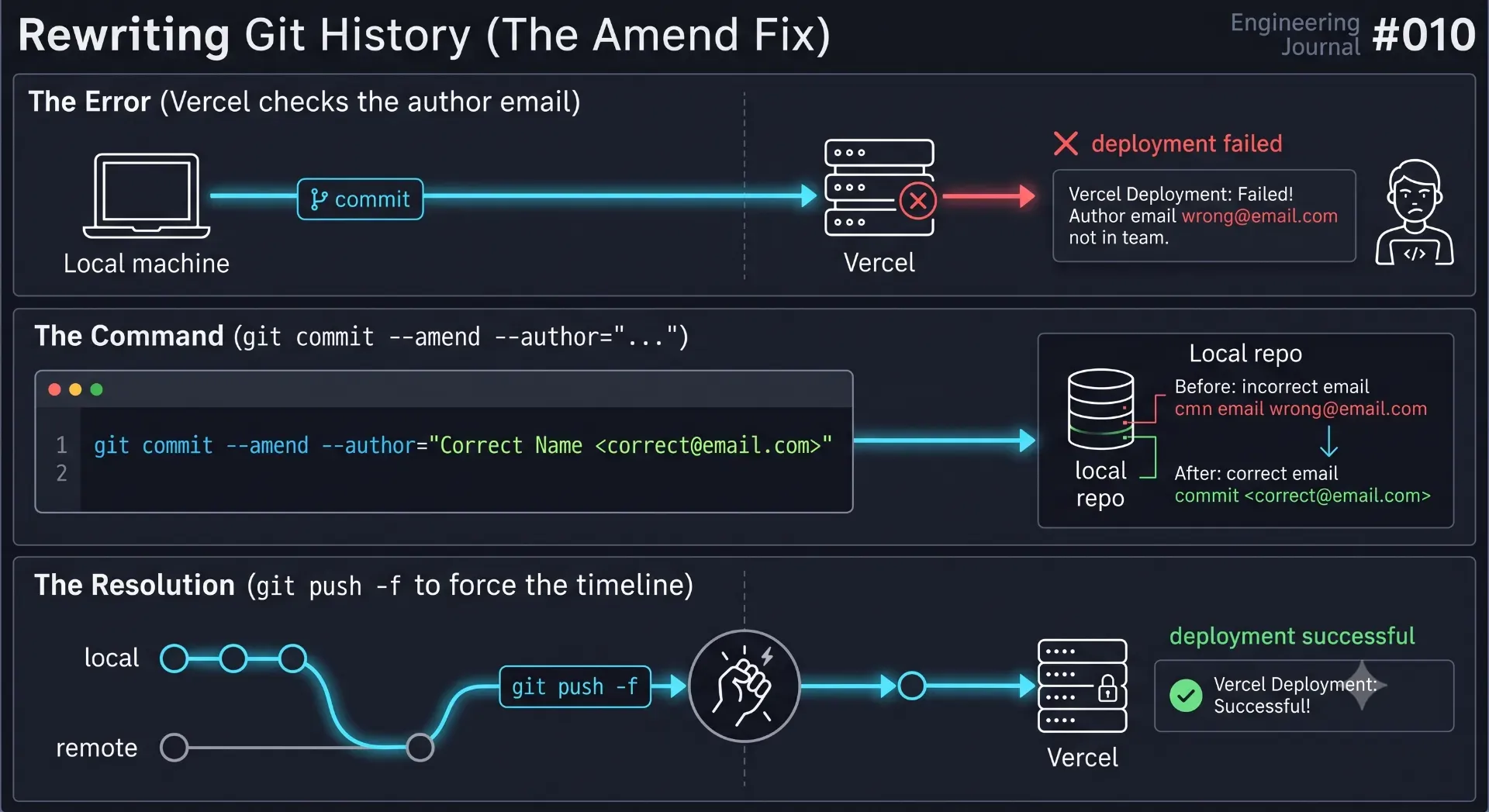
GitHub accepted the push, but Vercel blocked the deployment because of Hobby plan collaboration limits. Discover how to fix Vercel commit author blocked errors by rewriting Git history with a simple amend command.
1. The Collaboration Handoff
2. The Vercel Identity Blockade
main branch of a connected GitHub repository, Vercel listens for a webhook and automatically triggers a production deployment.3. Authentication vs. Authorship
How GitHub Sees the World (Authentication)
git push, GitHub only cares about the network layer. It asks: "Does the SSH key or Personal Access Token making this HTTPS request have write access to this repository?"How Vercel Sees the World (Authorship)
git commit on his laptop, his local Git installation grabbed the email address stored in his global configuration file (git config --global user.email) and permanently stamped it onto that commit.- Committer:
Friend's Email Address - Vercel Account Owner:
My Email Address
4. The Fix: Rewriting Git History
Breaking Down the Command:
--amend: Tells Git not to create a new commit, but to open up the very last commit and modify it.--author="Name <email>": Instructs Git to strip out my friend's email address and replace it with my own, thereby spoofing the authorship to match my Vercel account.--no-edit: Tells Git to keep the original commit message ("Migrate to Digitrust Light UI and update Team Section") without opening the Vim text editor.
5. Forcing the Timeline (The Force Push)
git push origin main after amending the commit, GitHub would reject it with an out-of-sync error.--amend command doesn't change the old commit; it destroys it and creates a brand-new commit with a brand-new cryptographic SHA-1 hash.-f (force) flag tells GitHub to ignore the timeline conflict and completely replace the remote main branch with our local branch.6. Engineering Takeaways: Infrastructure Awareness
- Git Config is God: Your local
.gitconfigfile dictates your identity across the internet. Always rungit config user.emailto verify who you are before committing on a new, borrowed, or secondary machine. - Authentication $\neq$ Identity: Passing a security check to upload files (GitHub) does not mean you pass the identity check to compile those files (Vercel).
- History is Malleable: As long as you are working on a solo project or a private branch, Git history is completely fluid. Do not be afraid to use
--amendor interactive rebases to clean up your metadata before pushing to production.
Conclusion
Production Case Studies & Architecture References
- Client Case Study: Indrani Luxury Shopify Case Study — Measured production deployment & business results.
- Topic Deep-Dive: Why My Green Vercel Deployment Returned a 404 — Detailed guide on adjacent engineering patterns.
- Engineering Consultation: Custom Next.js & SaaS Development — Custom software engineering & architecture advisory.
💡 Key Engineering Takeaways
Frequently Asked Questions
Why does Vercel block deployments from other commit authors?
Vercel enforces strict billing limits on its free Hobby tier. The Hobby plan is meant for individual, non-commercial projects and explicitly forbids team collaboration on private repositories. To enforce this mechanically, Vercel rejects any commit authored by an email address that does not belong to the primary Vercel account holder.
What is the difference between git authentication and git authorship?
Authentication is the process of proving you have permission to upload code to a server (usually via SSH keys or access tokens). Authorship is merely a text string (Name and Email) attached to the commit itself. GitHub verifies authentication; Vercel verifies authorship.
What does the `git commit --amend` command actually do?
Instead of creating a new commit, `--amend` modifies the most recent commit. Technically, it creates a completely new commit with a new hash that replaces the previous one. It is highly useful for fixing typos in commit messages, adding forgotten files, or changing the commit author.
Is it safe to use `git push -f` (force push)?
It is safe if you are working on a solo project or an isolated feature branch. However, force pushing rewrites the remote history. If you force push to a shared branch (like `main`) where other developers have already pulled the old commits, you will permanently corrupt their local repositories and cause massive merge conflicts.
How do I permanently fix my Git identity on a new laptop?
Open your terminal and run `git config --global user.name "Your Name"` and `git config --global user.email "your.email@example.com"`. This sets the default authorship for every future commit you make on that specific machine.
Feedback
Was this article helpful?
Related Engineering Diaries
How I Built Software Around Two Busy Admins
Most B2B SaaS is built for an ideal world of uninterrupted focus. Real enterprise environments are c...
Why My Green Vercel Deployment Returned a 404
Vercel displayed a green deployment success badge, but my live production URL returned a pristine 40...
Building 82 Pages in 49 Seconds: What Actually Made the Difference
Stop wasting expensive CI/CD minutes on slow deployments. Discover seven proven architectural secret...