
My Admin Dashboard Returned a 404... But the Route Existed
I spent hours debugging middleware, redirects, and server routing before discovering the real culprit behind a missing page: a six-line JavaScript Temporal Dead Zone mistake that completely crashed the React component before it could render.
1. The Weirdest 404 I've Seen
- Maybe the redirect in
next.config.jswas misconfigured. - Maybe Next.js wasn't generating the page during the build step.
- Maybe the edge middleware was blocking the request and incorrectly throwing a Not Found response.
2. The Investigation Pipeline
Was the redirect broken?
/admin/leads. I monitored the network tab in Chrome DevTools. The HTTP 307 Temporary Redirect fired perfectly, and the URL in the address bar updated correctly. The router was doing its job.Was middleware blocking access?
console.log statements inside the middleware.ts file to track the request lifecycle. The authentication token was verified correctly. The middleware successfully passed the request down to the actual route handler without terminating the response early.Did the page actually exist in the filesystem?
/admin/leads to this exact page.tsx file and rendered the dashboard. Everything looked perfect.3. The Real Bug: A JavaScript Syntax Trap
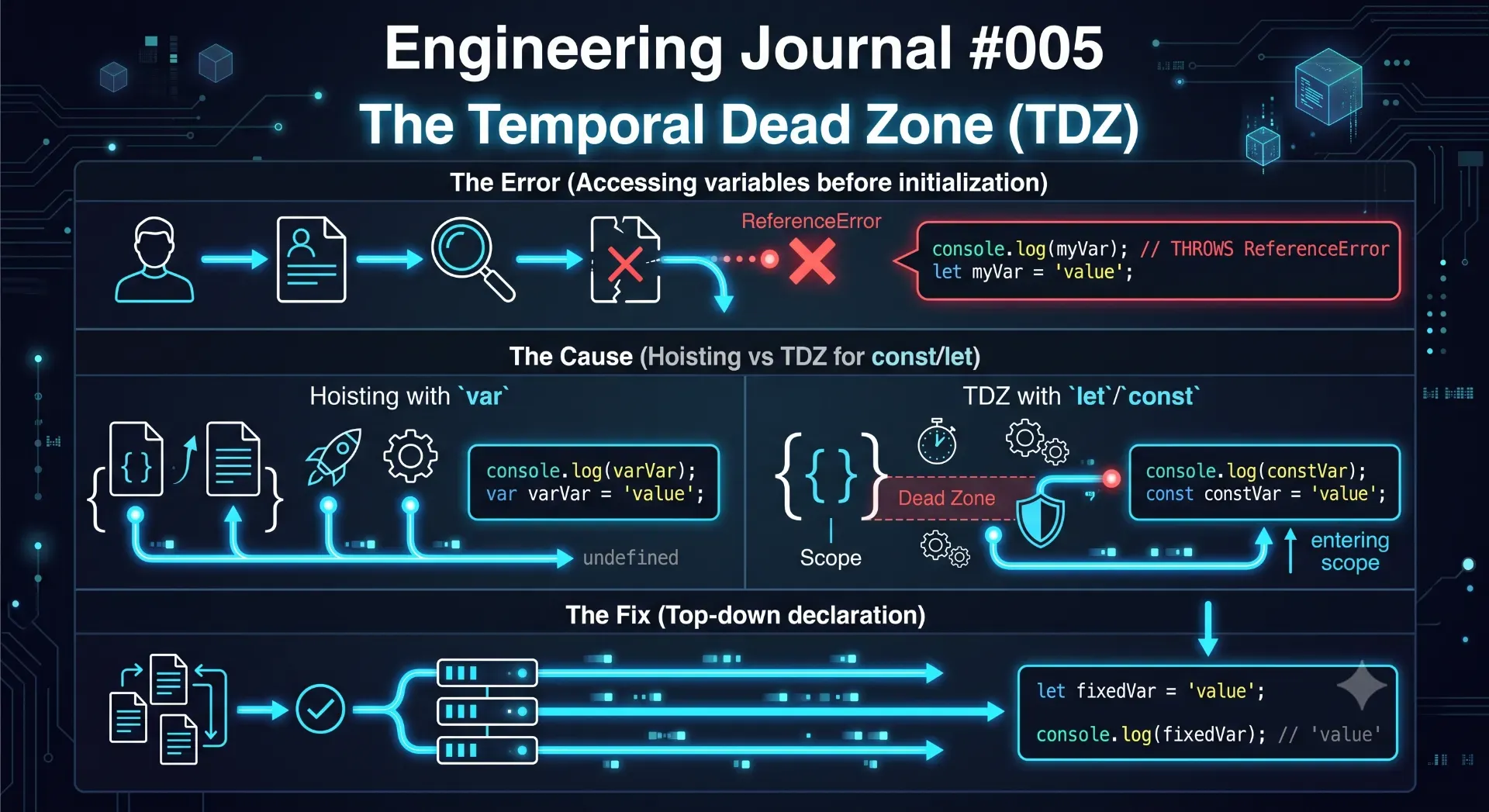
app/admin/leads/page.tsx to look at the actual React code. The actual problem had absolutely nothing to do with Next.js, React, or routing.useMemo() hook references the leads variable in its dependency array and its callback function. However, the leads variable is not declared until the very next line via the useState hook.const or let live inside a state called the Temporal Dead Zone (TDZ). This means that while the JavaScript engine knows the variable exists in the block scope (due to hoisting), it completely forbids you from accessing or referencing that variable until the execution thread actually passes over its declaration line.undefined. It violently throws a fatal exception:4. Why a Component Crash Looked Like a 404
error.tsx boundary file for the /admin route segment, the framework didn't know how to gracefully handle the fatal ReferenceError.5. The Fix: Escaping the Temporal Dead Zone
next.config.js redirects. I didn't have to clear the Vercel cache. I just had to respect the fundamental rules of JavaScript execution.6. Deep Dive: Understanding the Temporal Dead Zone
ReferenceError: Cannot access 'user' before initializationvar, it was "hoisted" to the top of the file and initialized with undefined. You wouldn't get a crash; you would just get a silent, logical bug because your data was missing.const and let were introduced in ES6, the ECMAScript committee wanted to eliminate these silent bugs. They designed the Temporal Dead Zone. When a block of code runs, JavaScript scans it and hoists the const and let declarations to the top of the block, but it leaves them uninitialized. The time between the start of the block and the moment the engine executes the declaration is the TDZ.useMemo tries to read leads before useState initializes it, the application will crash.7. Preventing the "Fake 404": Error Boundaries
error.tsx file alongside your page.tsx file.error.tsx file in place originally, the browser would not have shown a confusing 404. It would have instantly rendered this red UI box specifically stating: Cannot access 'leads' before initialization. I would have fixed the bug in exactly 10 seconds instead of wasting two hours debugging my middleware logic.8. Conclusion: The Psychology of Debugging
💡 Key Engineering Takeaways
Frequently Asked Questions
What is the JavaScript Temporal Dead Zone (TDZ)?
The Temporal Dead Zone (TDZ) is the specific period of time during runtime execution between entering a block scope and actually reaching the declaration of a `let` or `const` variable. Accessing the variable during this period throws a fatal `ReferenceError`.
Why did Next.js show a 404 if the route existed?
The route itself existed perfectly within the file system. However, the page component threw a fatal exception during initialization before React could successfully render it. Without a proper error boundary (`error.tsx`) catching the crash, the server-side rendering process aborted, which caused the application to present a fallback error state that mimicked a routing failure.
Does this Temporal Dead Zone issue only happen with React?
No. The TDZ is a fundamental JavaScript language feature introduced in ES6. React components simply execute standard JavaScript from top to bottom, so the exact same strict rules apply whether you are writing React, Vue, Node.js, or vanilla JavaScript.
How do I avoid this issue in the future?
Always declare your state variables (`useState`) and static variables before any hook (like `useEffect` or `useMemo`) or function that references them. Keep related state declarations organized together near the absolute top of your component body.
What is the biggest architectural lesson here?
Never debug based only on the visible symptom. A routing error can easily be caused by a JavaScript syntax crash. Always utilize Next.js `error.tsx` boundaries so that fatal component errors report their exact stack trace rather than collapsing the entire page into a misleading 404.
Feedback
Was this article helpful?
Related Engineering Diaries
Why AI Disabled ESLint Instead of Fixing My Code
An AI coding agent tried to silence dozens of lint errors by injecting eslint-disable comments inste...
Everything Returned 200 OK... But My Dropdown Was Still Empty
I spent nearly eight hours debugging an empty dropdown in my Next.js admin panel. The API returned a...
One Shopify CDN Image Broke My Detection Engine
A single Shopify CDN image completely fooled my custom website detection engine into returning a fal...