GitHub Accepted My Code. Vercel Rejected My Identity.
GitHub accepted the push, but Vercel blocked the deployment because of Hobby plan collaboration limits. Discover how to fix Vercel commit author blocked errors by rewriting Git history with a simple amend command.
In software engineering, you quickly learn that different platforms evaluate "identity" in vastly different ways. I recently experienced a fascinating infrastructure blockade while updating the Webshastraa website.
The task was straightforward: we were migrating the frontend to the new "Digitrust Light UI" and updating the Team Section. Because I was switching environments, I zipped the codebase and sent it to a friend's laptop to help me finalize the UI adjustments. When the work was done, we synced the code, committed the changes, and pushed it to the main branch.
GitHub accepted the push instantly. The repository updated. The Git graph looked perfect.
Then, Vercel intervened. The deployment pipeline triggered, spun up, and immediately crashed, throwing a hard block. It refused to compile a single line of Next.js code. The error had nothing to do with syntax, ESLint, or serverless functions. It was entirely about identity.
This engineering journal breaks down exactly why GitHub and Vercel look at identity differently, the mechanics of Vercel's Hobby plan enforcement, and how to surgically rewrite Git history to bypass the blockade.
---
1. The Collaboration Handoff
The root of this bug started with a localized workflow. I was working on my main laptop but needed a friend to help execute the heavy lifting for the Webshastraa Team Section update. Instead of setting up complex organizational access for a quick pairing session, I simply zipped the project files and handed them over.
After he finished coding the Digitrust Light UI components on his machine, we needed to get the code into production. To avoid merge conflicts and ensure a clean slate with the remote repository, we ran a standard synchronization sequence in his terminal:
Everything executed flawlessly. GitHub processed the push, the commit appeared in the remote repository, and the codebase was successfully merged.
---
2. The Vercel Identity Blockade
Whenever code is pushed to the main branch of a connected GitHub repository, Vercel listens for a webhook and automatically triggers a production deployment.
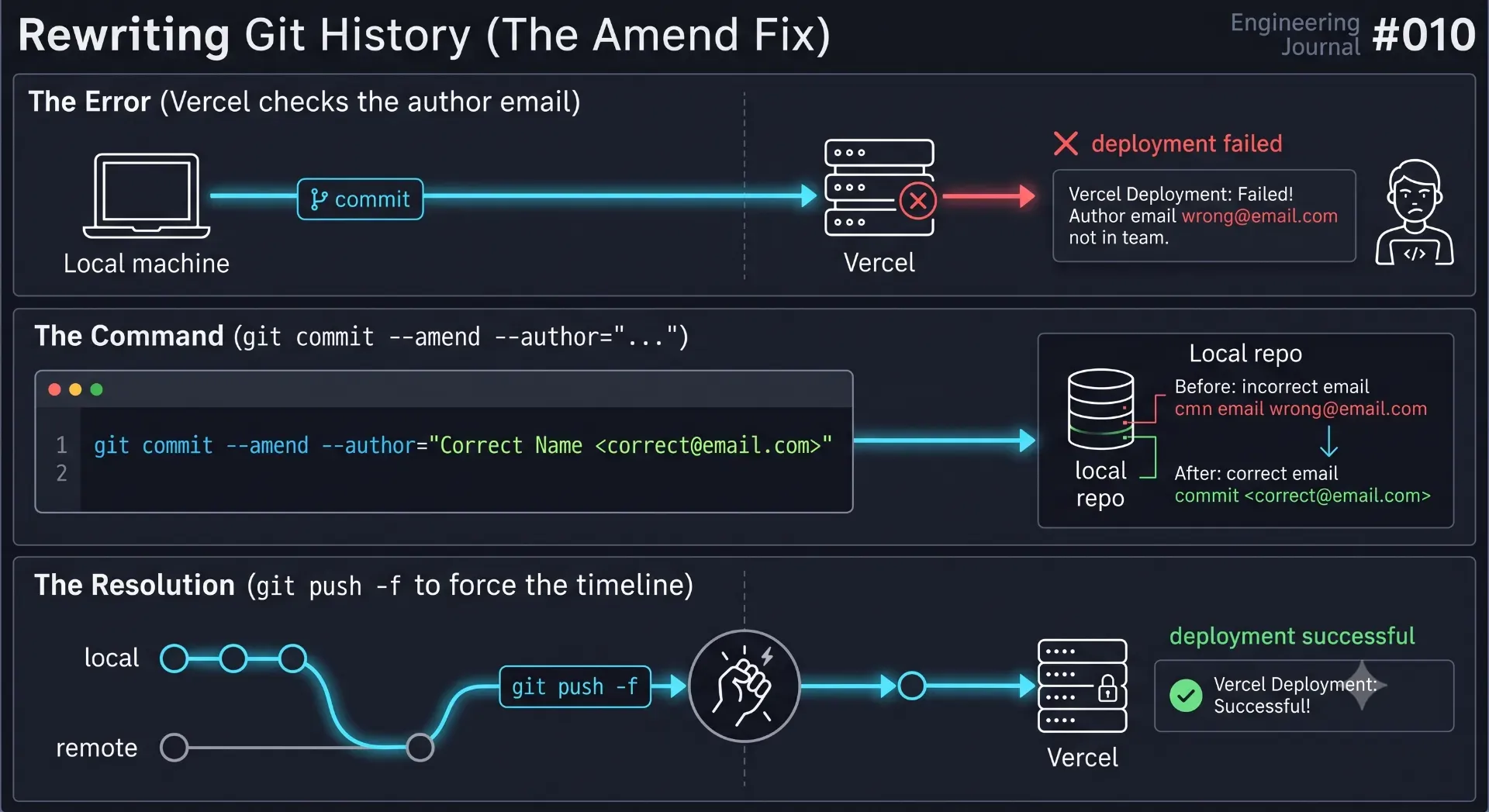
I opened the Vercel dashboard to watch the build logs. Instead of seeing the usual Webpack compilation steps, the deployment was instantly aborted. Vercel flashed a red warning box with this exact message:
I was initially confused. I was the owner of the GitHub repository. My authentication keys were used to push the code. The GitHub repository was connected directly to my personal Vercel account.
So why was Vercel telling me I didn't have access to my own project?
---
3. Authentication vs. Authorship
To understand why this error occurred, you must understand the fundamental difference between Git authentication and Git authorship.
How GitHub Sees the World (Authentication)
When you type git push, GitHub only cares about the network layer. It asks: "Does the SSH key or Personal Access Token making this HTTPS request have write access to this repository?"
Because we authenticated the terminal session using my credentials, GitHub saw a completely valid, authorized network request and accepted the push. GitHub does not care who wrote the code; it only cares who delivered it.
How Vercel Sees the World (Authorship)
Vercel's deployment engine looks deeper. When Vercel receives the webhook from GitHub, it inspects the commit metadata payload.
Every Git commit contains a hardcoded author string. When my friend typed git commit on his laptop, his local Git installation grabbed the email address stored in his global configuration file (git config --global user.email) and permanently stamped it onto that commit.
When Vercel read the commit payload, it saw:
- Committer:
Friend's Email Address - Vercel Account Owner:
My Email Address
Vercel's business model for the free "Hobby" tier strictly forbids team collaboration on private repositories. To enforce this, their system requires a 1-to-1 match. The email address stamped inside the Git commit must exactly match the email address of the Vercel account owner. Because the commit was stamped by his laptop's configuration, Vercel's automated billing gatekeeper identified him as an unauthorized collaborator and instantly blocked the build.
---
4. The Fix: Rewriting Git History
The problem was entirely isolated to the metadata attached to the most recent commit. We didn't need to change the Next.js code, we didn't need to change the Vercel settings, and we certainly didn't need to pay $20/month to upgrade to a Vercel Pro plan just to resolve a one-off laptop switch.
We just needed to surgically alter the past.
We opened the terminal and executed a Git command designed to rewrite the authorship of the most recent commit:
Breaking Down the Command:
--amend: Tells Git not to create a new commit, but to open up the very last commit and modify it.--author="Name <email>": Instructs Git to strip out my friend's email address and replace it with my own, thereby spoofing the authorship to match my Vercel account.--no-edit: Tells Git to keep the original commit message ("Migrate to Digitrust Light UI and update Team Section") without opening the Vim text editor.
By running this single line, the local commit was successfully rewritten. I was now officially the author.
---
5. Forcing the Timeline (The Force Push)
There was one final hurdle.
If we simply typed git push origin main after amending the commit, GitHub would reject it with an out-of-sync error.
Why? Because Git is an immutable ledger. You cannot actually "edit" a commit. The --amend command doesn't change the old commit; it destroys it and creates a brand-new commit with a brand-new cryptographic SHA-1 hash.
GitHub was still holding the old commit (authored by my friend). My laptop was holding the new commit (authored by me). The timelines had diverged. To solve this, we had to tell GitHub to aggressively overwrite its history with our new history:
The -f (force) flag tells GitHub to ignore the timeline conflict and completely replace the remote main branch with our local branch.
The moment the force push succeeded, GitHub fired a new webhook to Vercel. Vercel inspected the new commit metadata, saw that the author's email matched the account owner's email, and instantly initiated the deployment. The Digitrust Light UI went live two minutes later.
---
6. Engineering Takeaways: Infrastructure Awareness
This minor hiccup serves as a fantastic lesson in modern cloud infrastructure and CI/CD pipelines.
When transitioning from building local projects to deploying enterprise architecture, you must realize that Platform-as-a-Service (PaaS) providers like Vercel, Netlify, and Cloudflare do not just host your code. They actively audit your metadata.
Key lessons from this workflow:
- Git Config is God: Your local
.gitconfigfile dictates your identity across the internet. Always rungit config user.emailto verify who you are before committing on a new, borrowed, or secondary machine. - Authentication $\neq$ Identity: Passing a security check to upload files (GitHub) does not mean you pass the identity check to compile those files (Vercel).
- History is Malleable: As long as you are working on a solo project or a private branch, Git history is completely fluid. Do not be afraid to use
--amendor interactive rebases to clean up your metadata before pushing to production.
---
Conclusion
The next time you share code across laptops or ask a friend to help debug a nasty React component on their machine, remember the invisible metadata attached to every keystroke.
Vercel didn't reject the code. The Next.js architecture was perfectly sound, and the UI migration was flawless. Vercel simply rejected the identity of the machine that zipped it.
By understanding the distinct layers between Git networking, commit hashing, and PaaS billing enforcement, a seemingly frustrating deployment blockade transforms into a simple, two-line terminal fix. Rewrite the author, force the timeline, and let the build run.
---
---
Frequently Asked Questions
Why does Vercel block deployments from other commit authors?
Vercel enforces strict billing limits on its free Hobby tier. The Hobby plan is meant for individual, non-commercial projects and explicitly forbids team collaboration on private repositories. To enforce this mechanically, Vercel rejects any commit authored by an email address that does not belong to the primary Vercel account holder.
What is the difference between git authentication and git authorship?
Authentication is the process of proving you have permission to upload code to a server (usually via SSH keys or access tokens). Authorship is merely a text string (Name and Email) attached to the commit itself. GitHub verifies authentication; Vercel verifies authorship.
What does the `git commit --amend` command actually do?
Instead of creating a new commit, `--amend` modifies the most recent commit. Technically, it creates a completely new commit with a new hash that replaces the previous one. It is highly useful for fixing typos in commit messages, adding forgotten files, or changing the commit author.
Is it safe to use `git push -f` (force push)?
It is safe if you are working on a solo project or an isolated feature branch. However, force pushing rewrites the remote history. If you force push to a shared branch (like `main`) where other developers have already pulled the old commits, you will permanently corrupt their local repositories and cause massive merge conflicts.
How do I permanently fix my Git identity on a new laptop?
Open your terminal and run `git config --global user.name "Your Name"` and `git config --global user.email "your.email@example.com"`. This sets the default authorship for every future commit you make on that specific machine.
Feedback